For using ESP32-S3 with GoodDisplay in weather station some pin’s are absent, so we can use another one’s
Repository: https://github.com/lmarzen/esp32-weather-epd
I have tested this configuration
// PINS FOR E-PAPER DISPLAY (SPI) - DESPI-C02 ADAPTER
const uint8_t PIN_EPD_BUSY = 5;
const uint8_t PIN_EPD_CS   = 10;
const uint8_t PIN_EPD_RST  = 6;
const uint8_t PIN_EPD_DC   = 7;
const uint8_t PIN_EPD_SCK  = 12;  // CLK on DESPI-C02
const uint8_t PIN_EPD_MISO = 13;  // Not used but define it
const uint8_t PIN_EPD_MOSI = 11;  // DIN on DESPI-C02

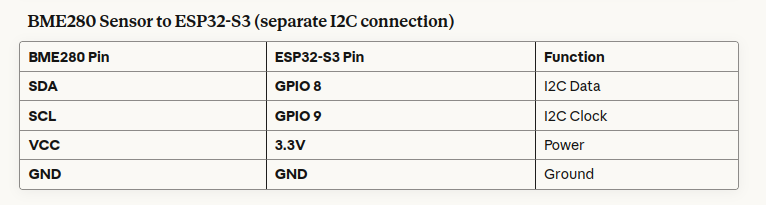
// PINS FOR BME280 SENSOR (I2C)
const uint8_t PIN_BME_SDA = 8;
const uint8_t PIN_BME_SCL = 9;

// PIN FOR BATTERY VOLTAGE (ADC)
const uint8_t PIN_BAT_ADC = 4;| DESPI-C02 Pin | ESP32-S3 Pin | Function | Notes |
| BUSY | GPIO 5 | Busy signal | |
| RST | GPIO 6 | Reset | |
| DC | GPIO 7 | Data/Command | |
| CS | GPIO 10 | Chip Select | |
| CLK | GPIO 12 | SPI Clock | Hardware SPI SCK |
| DIN | GPIO 11 | SPI Data | Hardware SPI MOSI |
| GND | GND | Ground | Multiple GND pins |
| 3.3V | 3.3V | Power |
Battery Connection
- Connect your 3.7V LiPo battery with JST-PH2.0 connector to the ESP32-S3’s battery connector
- Battery voltage monitor: GPIO 4 (for voltage reading)
Also – if you testing without the battery, it is possible to use debug mode
uint16_t adc_val; // Declare BEFORE the if statement

if ( DEBUG_LEVEL >= 1 )
{
  adc_val = 4000; // Simulate full battery for testing
}
else
{
  adc_val = analogRead(PIN_BAT_ADC); // Read actual battery voltage
}

// Now adc_val can be used below
uint32_t batteryVoltage = esp_adc_cal_raw_to_voltage(adc_val, &adc_chars);